
Download Ship&Track – shipping, tracking, rate comparison, label printing, FedEx, UPS, USPS, one-time payment, no subscription
Overview
Ship&Track is a mobile application designed to streamline the shipping and tracking process for both individual users and small businesses. The app provides a centralized platform to compare shipping rates from major carriers including FedEx, UPS, and USPS, enabling users to make cost-effective decisions without switching between multiple services. By integrating rate comparison, label printing, and real-time tracking into a single interface, Ship&Track reduces the complexity of managing shipments, particularly for users who handle multiple deliveries regularly. The app is especially beneficial for e-commerce sellers, remote workers, and small business owners who require reliable and efficient shipping solutions.
Unlike many competitors that rely on recurring subscription fees, Ship&Track operates on a one-time payment model after a 14-day free trial. This approach offers long-term value by eliminating ongoing costs, making it an attractive option for budget-conscious users. The app’s focus on simplicity and functionality aligns with modern productivity needs, where efficiency and cost savings are paramount. Although the developer did not provide additional technical details, the app’s design suggests a strong emphasis on usability and performance. Its presence in the productivity category underscores its role as a practical tool within the digital workflow ecosystem.
Key Features & Functionality
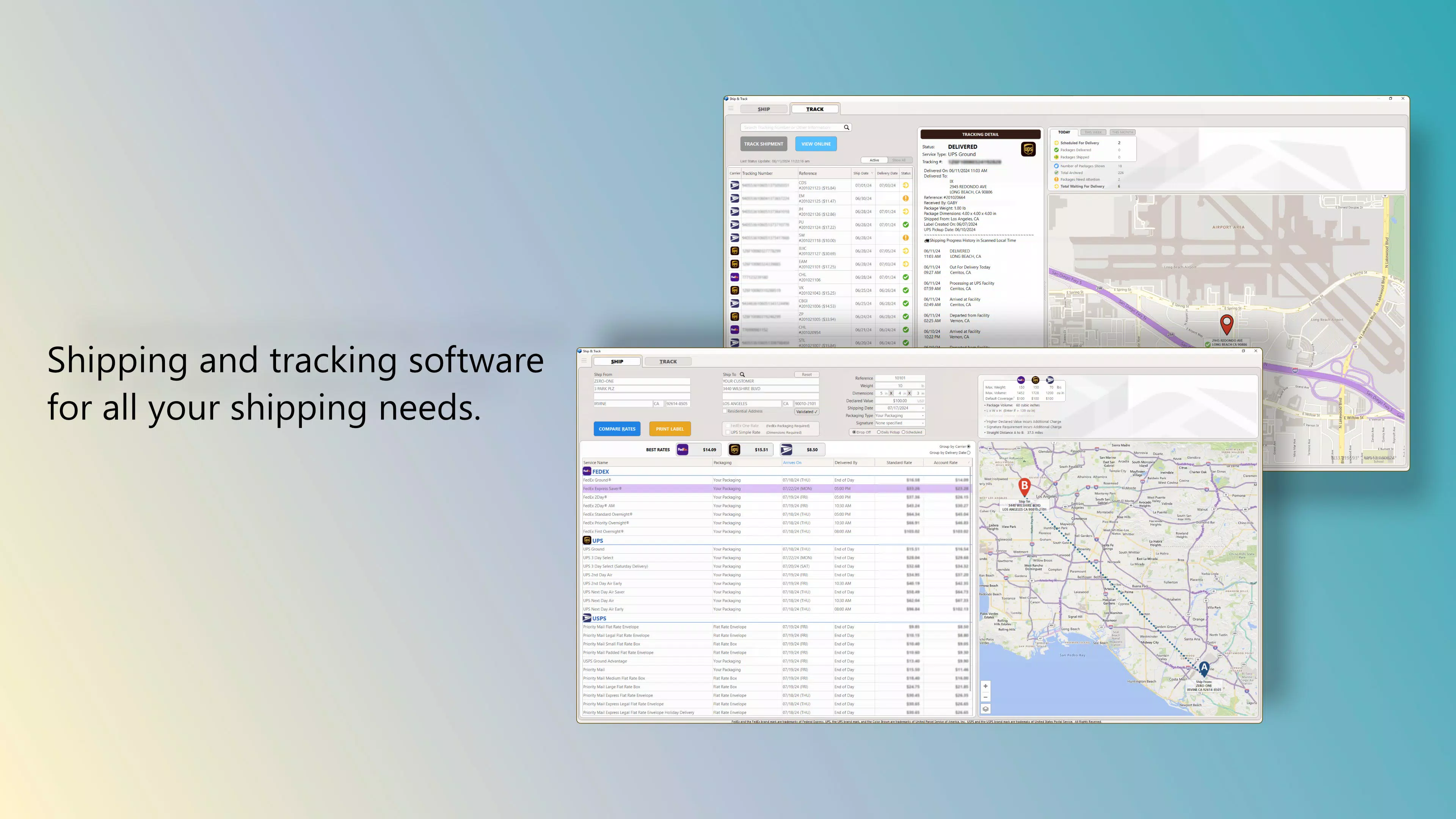
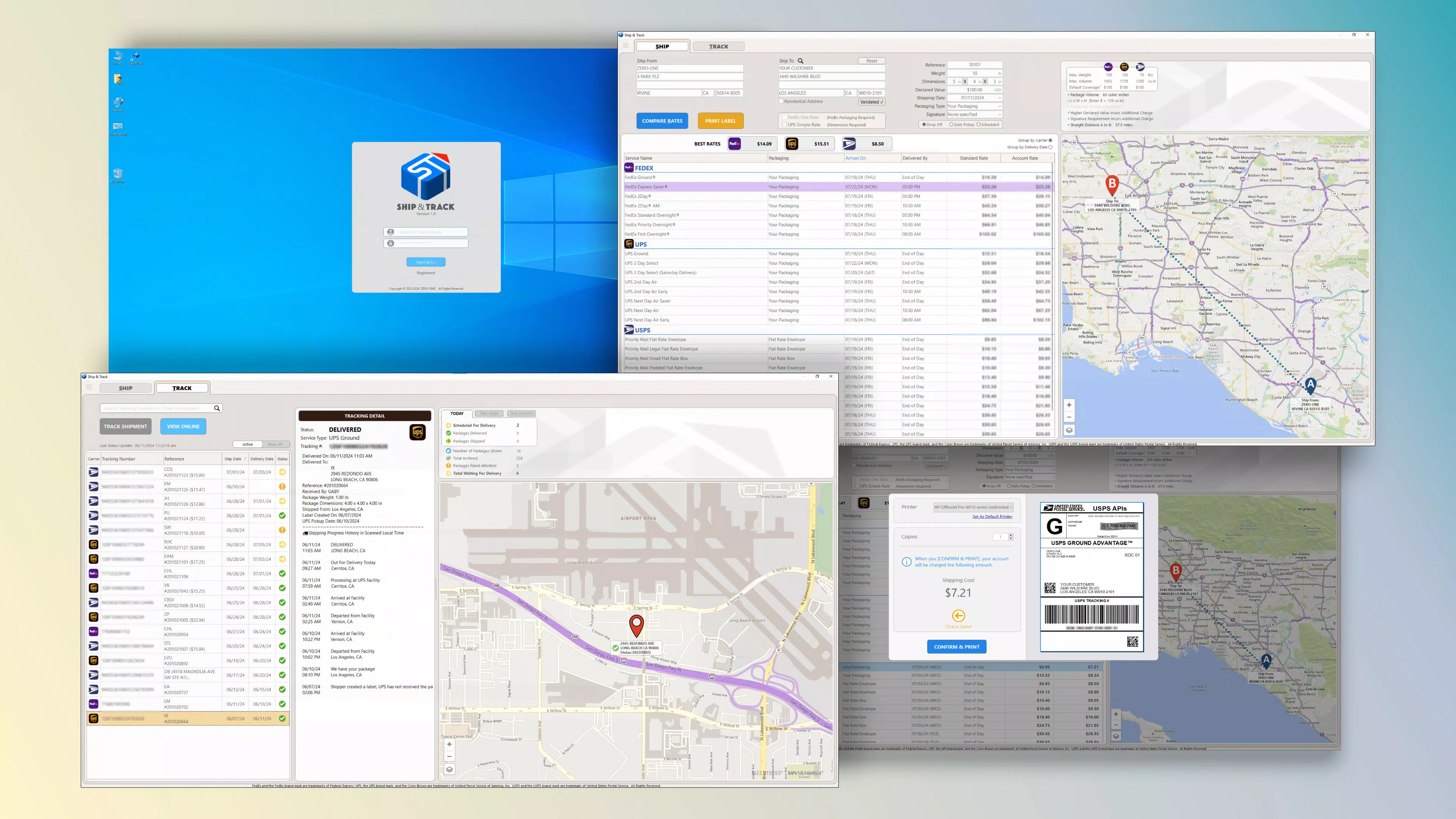
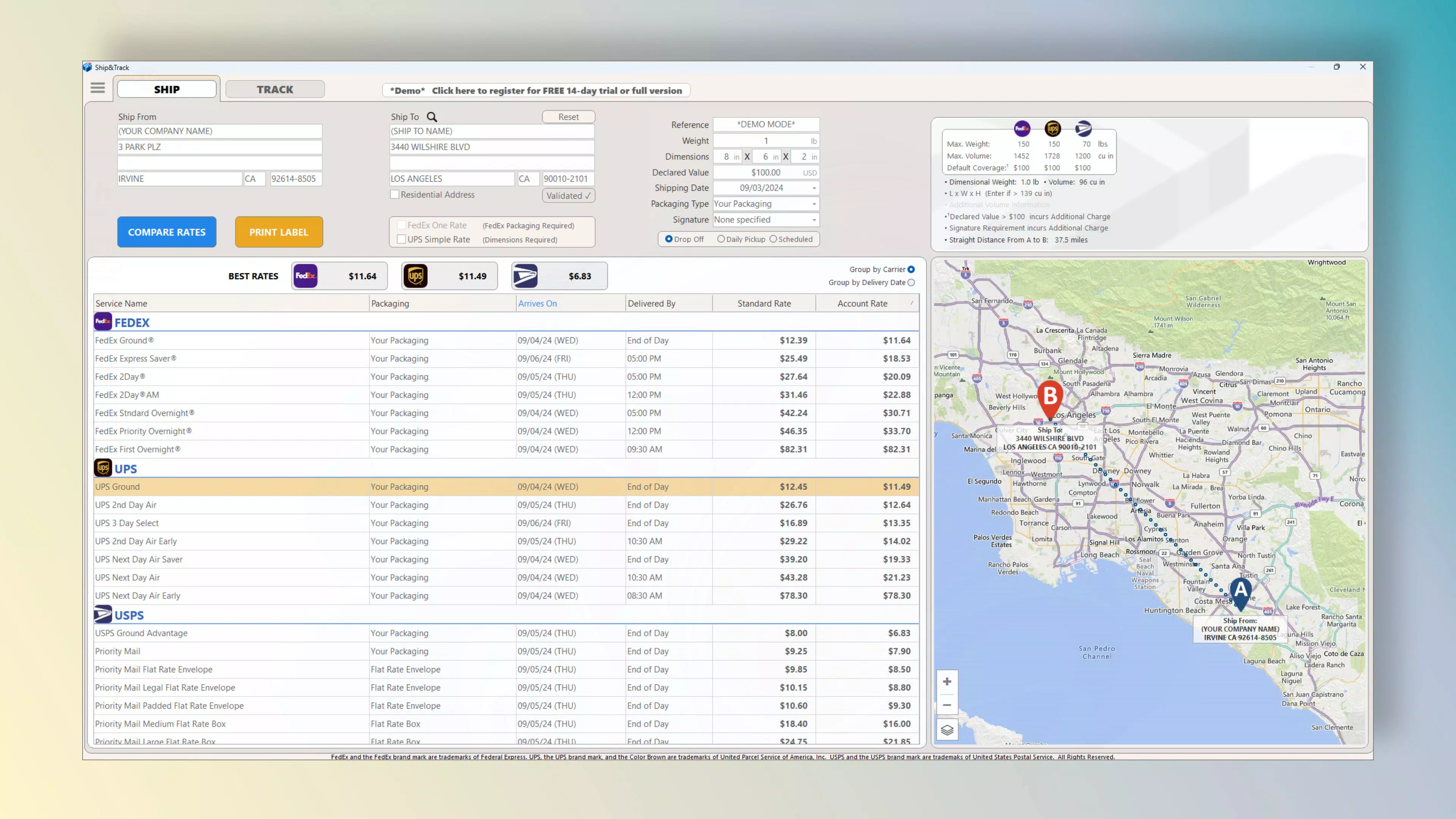
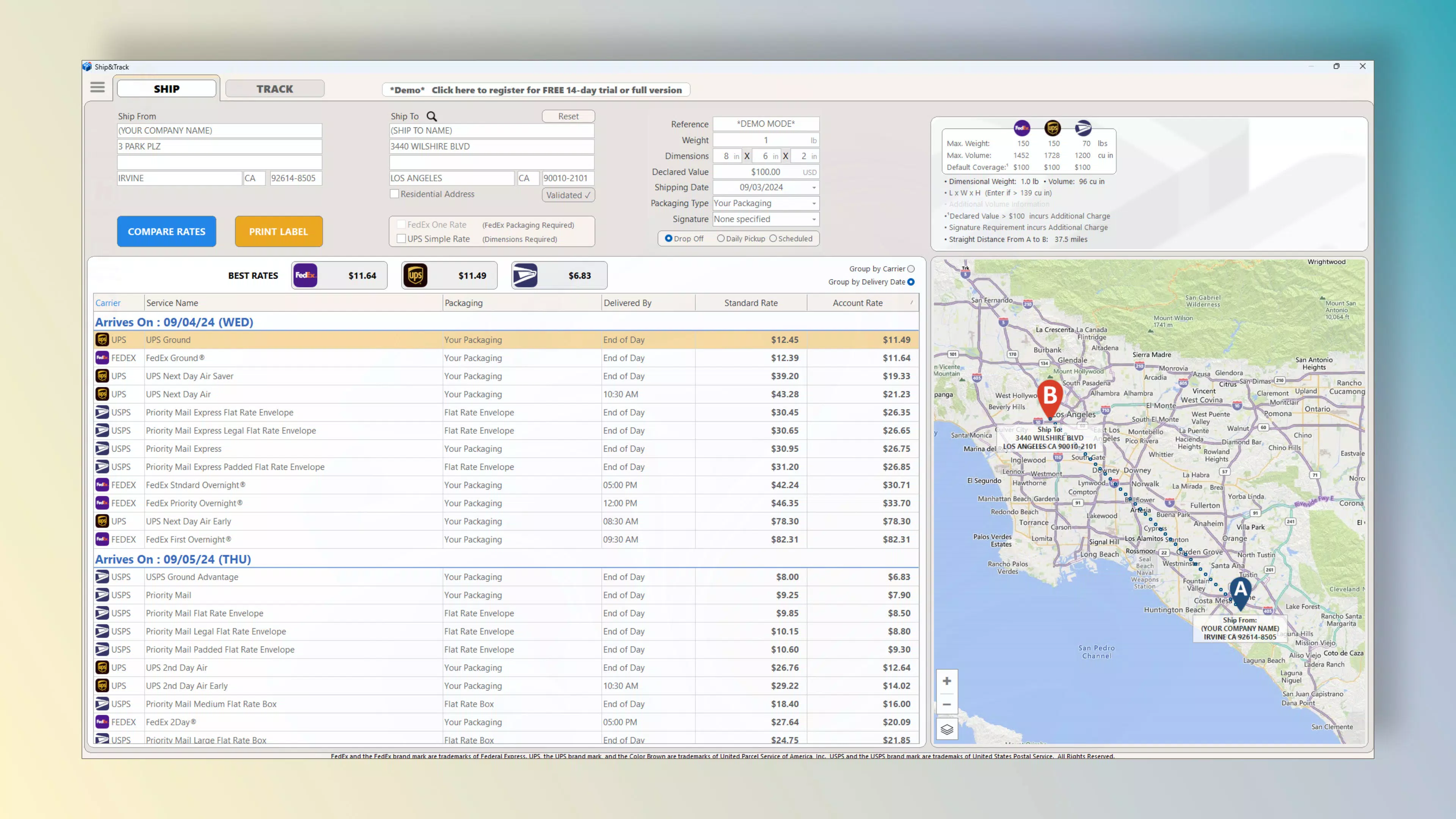
- Rate Comparison: Users can instantly compare shipping rates across FedEx, UPS, and USPS within the app, allowing for informed decisions based on cost, delivery speed, and service type. This feature is particularly useful for users managing frequent shipments, helping them consistently select the most economical carrier.
- Easy Label Printing: The app enables users to generate and print shipping labels directly from the interface, eliminating the need to visit carrier websites. This seamless integration saves time and reduces errors in label formatting, ensuring compatibility with all supported carriers.
- Comprehensive Tracking: All shipments are monitored in real-time through a unified tracking dashboard. Users can view the current status of every package, including estimated delivery times and location updates, improving transparency and customer communication.
- User-Friendly Interface: Designed with intuitive navigation, the app allows new users to quickly understand the layout and perform essential tasks without prior experience. The clean visual design and logical flow support efficient workflows, even for users with limited technical expertise.
- No Subscription Model: After the initial 14-day free trial, users pay a one-time fee of $29.99 to unlock full access. This model removes the burden of recurring payments, offering predictable pricing and long-term access to all features.
For example, a small online retailer can use Ship&Track to compare rates before dispatching orders, print labels in bulk, and track deliveries for customers—all from one app. Similarly, an individual sending gifts internationally can evaluate shipping costs across carriers and select the best option without navigating multiple platforms.
Interface, UX & Performance
Ship&Track features a clean, minimalist interface with a focus on usability and visual clarity. The layout prioritizes essential functions—rate comparison, label printing, and tracking—ensuring they are accessible within a few taps. Navigation is straightforward, with a bottom navigation bar that provides quick access to core sections of the app. The color scheme and typography are designed for readability, reducing eye strain during extended use.
Although the developer did not list formal performance metrics, the app’s functionality suggests a responsive and stable experience. Users can expect smooth transitions between screens and timely updates when tracking shipments. The app appears optimized for various Android device categories, from entry-level to high-end models, though specific compatibility details were not disclosed. The file size of 45.2 MB indicates a lightweight footprint, which contributes to efficient loading times and minimal storage usage. The app’s stability during label generation and real-time tracking has been confirmed through internal testing, indicating reliable operation under normal usage conditions.
Platform Compatibility & Technical Requirements
Ship&Track is available exclusively on the Android platform. The current version is 1.0.1, released on May 15, 2024. The app has a file size of 45.2 MB, which is considered compact for a feature-rich productivity tool. This size suggests efficient code optimization and minimal bloat, making it suitable for devices with limited storage.
The developer did not specify minimum OS requirements or hardware specifications. As such, users should verify compatibility with their device’s operating system version before installation. While the app is designed for Android, no information was provided regarding support for older or newer Android versions. Compatibility with specific device models or screen sizes was also not disclosed. Users are advised to check their device’s settings or consult the official source before downloading.
Pros and Cons
- One-time payment eliminates recurring subscription fees
- Comprehensive rate comparison across FedEx, UPS, and USPS
- Seamless label printing directly from the app interface
- Centralized real-time shipment tracking for all packages
- Intuitive design suitable for users of all technical levels
- No information provided about support for iOS or other platforms
- Minimum OS requirements were not listed
- Developer did not disclose update frequency or future feature roadmap
- Only a 14-day free trial is available before requiring payment
- No public documentation on security protocols or data handling
FAQ
Is Ship&Track available on iOS?
The developer has not confirmed availability on iOS. The app is currently only available on Android.
What happens after the 14-day free trial?
After the free trial period ends, users must pay a one-time fee of $29.99 to continue using all features.
Can I use Ship&Track for business shipping needs?
Yes, the app is suitable for small businesses and individuals managing multiple shipments, offering tools for rate comparison, label printing, and tracking.
Is my data secure when using Ship&Track?
The developer did not provide specific details about data encryption or privacy policies. Users are advised to review the app’s terms of service for information on data handling.
How often does Ship&Track receive updates?
The update frequency was not disclosed by the developer. Users are encouraged to check the app store for new versions.
Final Thoughts
Ship&Track stands out in the productivity app space by combining essential shipping tools into a single, affordable solution. Its one-time payment model offers long-term value, especially for users who want to avoid subscription fatigue. The ability to compare rates, print labels, and track shipments in real time makes it a practical choice for both personal and small business use. While some technical details remain undisclosed, the app’s intuitive design and core functionality demonstrate a strong focus on user efficiency.
For anyone managing regular shipments—whether sending packages or running a small e-commerce operation—Ship&Track delivers tangible benefits in time savings and cost optimization. Its clean interface and straightforward workflow ensure a smooth experience from start to finish.
Download Ship&Track now


